Showing posts with label USB. Show all posts

Wednesday, March 2, 2016

How to Make bootable pendrive easily


1:-we take the 8GB(minimum) pen drive.

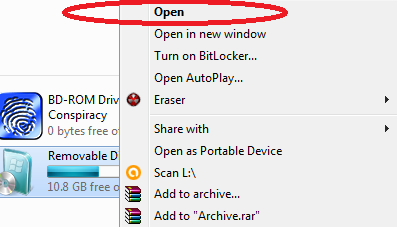
2:-then right click on pendrive(as given in picture)


3:- Choose  "NTFS" file system and  uncheck quick format then click start button.


4:- After complete the formatting process we have insert the bootable disk of operating system like windows 7, 8, 10(as given below).


5:- Copy all the files in in your bootable window CD and PASTE in PENDRIVE.

    !!the bootable process completed after the copying file and use as bootable pendrive!!


Sunday, July 24, 2011

How to lock Or unlock your system by USB


This is very use full trick for your system protection. 
When you entered your USB. when you work on your 
system, and when you removed your USB. when you are 
not work on your system, and block your Keyboard and Mouse.


1:-Firtlsy download this software “Predator”.

2:-After install this software then launch this software 
    and plug-in your USB device.

3:-Define the New password for USB then click “ok” and 
     retype password.

4:-Check your USB current drive letter(G:) and click “Create key”

5:-Then click “Ok” button. .  


Requirement:- Microsoft .NET framework 2.0 and above version. 


Wednesday, July 6, 2011

How to block USB port without software


This trick is very use full for your personal PC and laptop some other people 
and friends are entered pen drive in your PC and laptop, result your computer 
have entered viruses and thief your important data or file.


 Mathode:-1


1:- Windows+"pause/break" button OR Start à Run à “devmgmt.msc" 
      type without quote

2:-Select Hardware tab and choose Device Manager.

3:-Let's find "Universal Serial Bus Controller" When find these 
    right click on "Universal Serial Bus Controller" and choose "Disable"

 Mathode:-2

1:-Restart your system and enter “Delete..” button continue booting time.

2:- Open BIOS setup and choose USB controller and press “Enter” 
      button then select disable.

3:-Press “F10” function key and press “yes”.