Showing posts with label Windows. Show all posts

Monday, April 17, 2017

HOW TO RECOVER VIRUS INFECTED OR HIDE DATA FILE IN PENDRIVE


METHOD:1


1. Insert your virus infected pen drive.

2. Open pendrive as “Open in new window”


3. Then type in search box “ *. ” without quote.


4. You will see your all files.

METHOD:2

1. Insert your virus infected pen drive.

2. Open “MyComputer” then click on “Options”


     3.  Select “Change folder and Search” then click on “View “ tab.
  

4. Now Uncheck Hide options in View tab.


Wednesday, March 2, 2016

How to Make bootable pendrive easily


1:-we take the 8GB(minimum) pen drive.

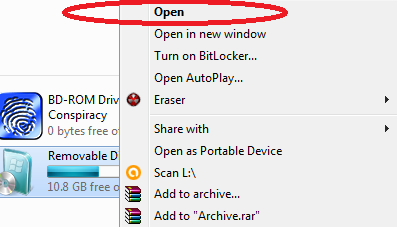
2:-then right click on pendrive(as given in picture)


3:- Choose  "NTFS" file system and  uncheck quick format then click start button.


4:- After complete the formatting process we have insert the bootable disk of operating system like windows 7, 8, 10(as given below).


5:- Copy all the files in in your bootable window CD and PASTE in PENDRIVE.

    !!the bootable process completed after the copying file and use as bootable pendrive!!


Saturday, June 1, 2013

How to Format your computer without CD/DVD of windows


1:-Firstly we have to need DEAMON TOOL software.

2:-Then create image of windows operating system from disk.

3:-Open deamon tool software and select for mount.


4:-After the add image of windows in deamon software the MOUNT the image
    And starting your computer formatting 

Saturday, April 20, 2013

How to create safely remove USB shortcut


1:-Right click on desktop screen then select "New" option.

2:-Then choose "Shortcut" and copy & paste below line in browse box.

         rundll32.exe shell32.dll,Control_RunDLL hotplug.dll

3:-After click on "Ok" button. 


Friday, October 19, 2012

How to create partition without formatting window in Window 7


1:- Firstly  press "Windows+R" button and type “compmgmt.msc” .

2:-Now Choose “Disk Management” on left panel.


3:-Right click on any enough(regarding space) disk and choose “Shrink” option.


4:-Then enter the amount of new disk(as per required you) then press “ok”.


Saturday, October 13, 2012

How to know mean of error message in hardware configuration


It could be possible to found the mean of error message of hardware 
configuration. when  you have run any type of program and that
time program get a error message in form of different different 
mean but you could know of the code following below...


In 16-Bit

0000h                                   Some cluster available 

FFFFh-FFFF6h                    Some Reserved cluster

FFF7h                                  If defective cluster is not a part of a chain

FFF8h-FFFFh                      Last cluster of file 

xxxx                                     Next cluster in file 


In 32-Bit


0000000h                            Some cluster available 
     

FFFFFFFh-FFFFFF6h       Some Reserved cluster


FFFFFF7h                          If defective cluster is not a part of a chain

FFFFFF8h-FFFFFFFh       Last cluster of file

xxxxxxx                             Next cluster in file 


Friday, July 20, 2012

How to make two or more file Or folder same name


It is possible make the two or more file as same name at same location.
It is possible threw ASCII code.

1:-Right click on file or folder  and choose “rename”.

2:-Then hold  “Alt” key and press "255".


3: Then again hold "Alt" and  following below number.

65 for A
66 for B
67 for C
68 for D as it…
.
.
.
91 for Z

Saturday, March 3, 2012

How to remove explorer.exe virus from your P.C


Hello friends, Often You are facing this problem , 
When your keyboard and mouse can not worked
after booting your computer, please follow these steps…..


After boot situation image when your system effected by explorer.exe virus


1:-Press Ctrl+Alt+Del, open task manger.

2:-Select "Processes" tab and find "explorer.exe" file.


3:-After select “explorer.exe” file choose “End Process”.

4:-choose “Applications” tab and click on “New task”.


5:-Open run command and type “explorer.exe” and click “Ok”.


AND AFTER APPLY THIS PROCESS YOU CAN SEE EFFECT BELOW


Monday, February 6, 2012

How to change boot time Operating system


When you are install two operating system in one 
system. You are set default any operating system either 
by using this trick.

1:-Right click on “My Computer” choose “Properties”.

2:-Then select “Advance” tab and choose “settings” option in
     “startup and recovery”.

3:-Drag list in system startup and choose any default O.S just like you. 

Saturday, December 31, 2011

How to run two operating system simultaneously


1:-firstly download virtual box software.


2:-Install this software then launch this software.

3:-After launch this software just follow these steps.

click on "Machine" tab OR "ctrl+N" and select "New" --> Next -->
"type file name like you"

then select base memory range "100 to 192MB" then click next

select "create new hard disk" then click next

and after again click next button

select "dynamically expanded storage" then click next.

Enter the location for creating virtual box in hard drive(c:\) location.

then click next button.

4:-Insert the any bootable disk and launch this software.

5:-In software you see right portion of software your creating file name are shown.

6:-double click on file and start the bootable disk simultaneously.


Requirement:- CD\DVD must be boot table.


Monday, November 14, 2011

How to remove blue shadow around icons on desktop


Basically create this problem, when you change the image on your desktop 
screen. So solve this problem following steps below. 


1:-Right click on desktop and choose "Arrange Icons By".


Tuesday, November 8, 2011

How to remove set access and default from start menu


This trick is very easy. this tricks is mostly create for more visitors is search
 this solution on this blog . So for this solution here for Visitors.........Thanks
 to all my visitors for viewing my blog everyday.


1:-Start à Run à "gpedit.msc" type without quote then find these below 
     location.

2:-User configuration  à Administrative Templates à  Start menu and 
     Taskbar

Friday, November 4, 2011

How to delete files and folder using software


You are face these following problem at deleting files and folder


When files and folder are not delete.
On trying to remove temporary files.
Files in a damaged pen drive (Access is denied ).
On trying to delete virus infected files or even virus itself.
courrupt Windows files.
removing uninstalled program's files.


etc......

Friday, October 28, 2011

How to change text to voice without software


1:-Open Notepad and copy and paste the following code in notepad.


Dim message, sapi
message=InputBox("Enter the Character for Speaking?","Text To Voice Changer")
Set sapi=CreateObject("sapi.spvoice")
sapi.Speak message


Wednesday, October 5, 2011

How to create CON name folder


1:-Create a folder.

2:-Then right click on folder then choose rename.

3:-Then Hold "Alt" and press "255" OR "0160" without quote.

4:-After these activities then type in folder "CON" name without quote.


Sunday, September 25, 2011

how to create shortcut of Lock computer & switch user


You can lock XP and Switching user with two clicks of the mouse.


1. Right click on desktop screen then choose "New" then "Shortcut" and 
    copy and paste below script.


    "rundll32.exe user32.dll" without quote


3. Give the shortcut a name you like.


Saturday, September 3, 2011

How to block any website


This tricks for block any website in your computer for every browser.


1:-Find this location and edit hosts file…….

     C:\WINDOWS\system32\drivers\etc

2:-After find this location right click on ‘hosts’ file name and then choose “open” as notepad.

3:-you see below this line in hosts file open in notepadn just find it’s.

127.0.0.1              localhost

4:-Just after this line you could create a website block address below..


127.0.0.2              “www.*********.com”  without quote.


5:-Then save this file “hosts” in notepad.


And Enjoy website blocking ……………….   


Sunday, August 28, 2011

How to hide user account in windows


1:-Start à Run à “regedit” type without quote.

2:-Find below this address in Registry 

[HKEY_LOCAL_MACHINE\SOFTWARE\Microsoft\Windows NT\CurrentVersion\Winlogon\SpecialAccounts\UserList]

3:-After find this address then right click on right portion of registry and 
    create “DWORD” value as your user account name on welcome screen{it must match).

New à DWORD à “type user name” à Enter value “0”

0 for hide 

1 for show


Thursday, August 25, 2011

how to hack Windows Password


Mathode:-1 by Dos


1:-Now restart your system and restart time press F8 button continue.

2:-Choose “Safe mode” and then choose “Administrator” account.

3:-start à Run à “cmd” Or “command” without quote.

4:-Now follow these command…

C:\>cd\ (Press enter)

C:\>net user (Press enter)

You see that different – different user name Choose any one User account 
name suppose that “ram” then type these command

C:\>net user ram (Press enter)

C:\>net user ram 12345 (Press enter)


Hack ram user account successfully the password is “12345”


Mathode:-2 by Run command


1:- start à Run à “compmgmt.msc” without quote.

2:-click on “Local user & group” in left portion.

3:-Then double click on “User” and right click on any user account name 
     and choose option “set password” then type new password click “ok” button.  


Mathode:-3 by software


This software is windows password hacking software.

Warning:-PLEASE Scan before intallation.


Information about installation into this software


Thursday, August 11, 2011

How To add any music in windows


This trick is add music in windows. Example:- you have start your 
computer start time you can listen startup music different and you can change it now.


1:- Start  à Run à “regedit” type without quote.

2:-Find this following address in registry……….

[HKEY_USERS\.DEFAULT\AppEvents\Schemes\Apps\.Default]

And open any one ……..

Example:-you can changed windows start music.

Choose……SystemStart

Click Current 

3:-In default right click on right portion.

4:-Choose modify and paste your music link in “default string value” and click ok